Tap to Pay with a Contactless Bank Card
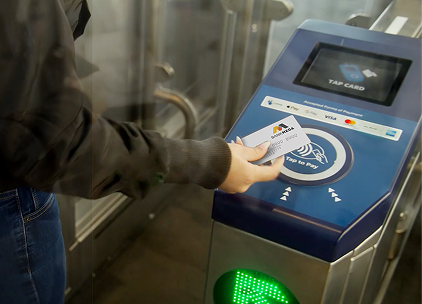
Now you can ride Bay Area transit by tapping your contactless bank card at a Clipper reader to pay your fare. Just look for the contactless symbol on your plastic card or pay using a contactless card in your mobile wallet.
Accepted card brands are Visa, Mastercard, American Express and Discover.
Please note: You will be charged the full adult fare when using a contactless bank card to pay for transit.
Common Questions
Look for the contactless symbol on the front or back of your bank card. If you see this symbol, you can use your contactless bank card to pay for transit. Accepted card brands are Visa, Mastercard, American Express and Discover.
There are a few things to know before you pay with a contactless bank card:
- Riders using a contactless bank card will be charged the adult fare
- Plastic bank cards must be contactless enabled. Contactless-enabled cards have a contactless symbol on either the front or back of the card.
- Each rider must pay with their own card or mobile device
- Make sure to use the same card or device to tap in and tap out
For step-by-step instructions, find your preferred payment method below:
Plastic contactless bank card
- Remove the physical credit or debit card—Visa, Mastercard, American Express, or Discover—from your wallet
- Center your card over the Clipper reader
- On a successful tap, a "Travel OK" message will appear on the reader screen, and gates will open where applicable
Contactless Bank Card in Apple Wallet
Apple device users should set up Express Mode for the bank card they want to use or should select the card they want to use from their Apple Wallet before tapping.
To set up Express Mode:
- Open Apple Wallet and choose the contactless bank card you want to use to pay for your ride
- Tap the three dots in the upper right-hand corner and select "Card Details"
- Tap "Express Transit Settings" and follow the prompts
To pay:
- Center your device over the Clipper reader—no need to unlock your phone
- On a successful tap, a "done" screen will appear on your device, and you can board or enter the fare gates
Contactless Bank Card in Google Wallet
- Open Google Wallet and choose the contactless bank card you want to use to pay for your ride
- To pay, unlock your device and center it over the Clipper reader
- If you prefer to pay without unlocking your device, turn off the "Verification required" setting:
- Open the Google Wallet app. At the top right, tap your Profile picture or Account and then Wallet settings
- Under "Security," tap Verification settings and then Transit payments
- Turn off Verification required
- On a successful tap, a "done" screen will appear on your device, and gates will open where applicable
If your card is not working and you are having difficulty tapping, please find an agent to assist you.
No, you will be charged the full adult fare when you pay with a contactless bank card.
Discounted fares through Clipper Youth, Clipper Senior, Clipper Access and Clipper START programs are NOT available through contactless bank card payment. Riders must use their discount program-issued Clipper cards to receive these discounted fares.
Riders can save up to $2.85 when you transfer between transit agencies. You must use the same contactless bank card or Clipper card for all of your taps in a single trip to receive the discount.
When using a physical payment card, remove your plastic card from your wallet before tapping to pay at a Clipper reader.
If you are paying with a card in your mobile wallet, keep your physical cards separate from your phone or watch when tapping. On Apple Wallet devices, turn on Express Mode. The feature can be found in the device’s Settings app under "Wallet & Apple Pay" and scrolling down to "Express Transit Card".
Note: Card clash occurs when a Clipper reader detects more than one card at a time, which can result in card reader errors or the wrong card getting charged. This applies to Clipper cards and contactless bank cards, including cards in digital wallets.
No, each rider must pay with their own card or device and must use the same card or device to tap in and tap out.
No. When riding agencies that have distance-based fares that require you to tap in and tap out, you must use the same card or device to avoid being overcharged.
You can easily review your transaction history with your contactless bank card on our website at Bank Card Trip History by entering your payment card number, expiration date and CVV. You can also check your bank statement.
Please contact the Clipper Customer Service Center for a refund or fare adjustment.
Yes, if your transit benefits debit card is contactless enabled (or can be added to your phone’s mobile wallet) you can tap it to a Clipper reader. Make sure to have sufficient transit balance on your card to pay for the fare.
Some customers with HealthEquity debit cards have reported issues tapping their plastic cards, even with sufficient funds in their account. This is a known issue with some HealthEquity plastic cards, and we are working with HealthEquity to ensure that this is addressed. If this issue arises for you, you should contact HealthEquity and request a replacement card.
For questions about how to use a contactless bank card to pay, or other questions such as trip history, please call 877.878.8883 Monday through Friday, 8 a.m.-5 p.m., and Saturday 9 a.m.-1 p.m.

